A Mental Model for Linux Permissions: rwx and owner/group/other
What you'll be able to do
- Read rwx and owner / group / other at a glance
- Break down a permission string such as rwxr-xr-x
Prerequisites (read these first)
Does the Permission String Look Like a Spell?
You run ls -l, and there it is at the start of each line: a string like -rw-r--r--. "What is this code supposed to mean?" That string is the file's permissions—the rules for who is allowed to do what with the file. "Permissions," "access rights," and "the file mode" are all different names for the same thing.
It looks cryptic, but the idea is simple. It is just two axes side by side: who and what they can do. In this guide, Lina and Linny-senpai sort out owner / group / other and the rwx (read / write / execute) bits. By the end, you'll glance at -rwxr-xr-- and instantly know what it grants.
What You'll Learn
- That permissions decide "who" can do "what" to a file
- The meaning of
owner,group, andother - The meaning of
r(read),w(write), andx(execute) - How to read the first 10 characters of
ls -l - How
rwxmeans something different for directories - How numeric modes like
755and644map torwx
1. Why Do Permissions Exist?
Conclusion: Permissions are the rule for "who may do what to this file." They stop others from reading or breaking your files without permissionThe read / write / execute access rules set on a file or directory..
-rw-r--r-- at the start of each ls -l line? I've been pretending I don't see it...Permissions = a "who" × "what" table
Permissions look hard, but they're built from just two axes.
- Who:
owner/group/other - What:
r(read) /w(write) /x(execute)
Once you grasp this 3 × 3 grid, you can decode any permission string.
2. What Are owner / group / other?
Conclusion: Permissions are set for three parties:
owner(the file's owner),group(members of its group), andother(everyone else).
owner, group, and other.owner is the person who created the file, its holder. The group is the set of people in the group assigned to the file. And other is everyone who is neither of those.owner is you, who wrote the document; the group is your team; other is people outside the company. For the same document you might want "I can edit," "my team can view," "outsiders can't touch it." Same idea.| Class | Short name | Who it refers to |
|---|---|---|
owner |
u | The person who owns the file |
group |
g | Members of the file's group |
other |
o | Everyone who is neither of the above |
The three are abbreviated u / g / o
In commands like chmod, owner is written u (user), group is g, and other is o. Write a (all) to mean all three at once. You'll use this shorthand later in forms like chmod u+x, so keep it in the back of your mind.
3. What Do r, w, and x Mean?
Conclusion:
ris read,wis write (change), andxis execute. You grant these three permissions to each of the three parties.
rwx part.r is read, w is write (change), and x is execute.script.sh, the file needs the x bit, or it won't run. A plain text note, on the other hand, usually doesn't need x.| Symbol | English | Meaning |
|---|---|---|
r |
read | Read contents / list entries |
w |
write | Change contents / add, delete |
x |
execute | Run it / enter it |
Missing permissions show up as -
Within rwx, any permission that isn't granted appears as - (a hyphen) in that position. So r-- means "read only; no write, no execute." rw- means "read and write, but no execute." Think of - as an empty seat: "no permission here."
4. How Do You Read the First 10 Characters of ls -l?
Conclusion: The first 10 characters are "1 type character + owner's rwx + group's rwx + other's rwx." Read them in blocks of three.
-rw-r--r--!-l in ls -l is an "option" — an extra instruction that changes how a command behaves. The leading hyphen is the giveaway, and -l is short for long (in detail).- for a regular file, d for a directoryA container that organizes files. Same idea as a "folder" on Windows or macOS.). Split the remaining nine into three, and from left to right you get the permissions for owner, group, and other. It's exactly the "who × what" grid from before.Split -rw-r--r-- and it reads like this:
-  rw-  r--  r--
↑   ↑    ↑    ↑
type owner group other
- Leading
-: a regular file (dwould be a directory) rw-: owner can readr, writew, but not execute-r--: group can only readrr--: other can also only readr
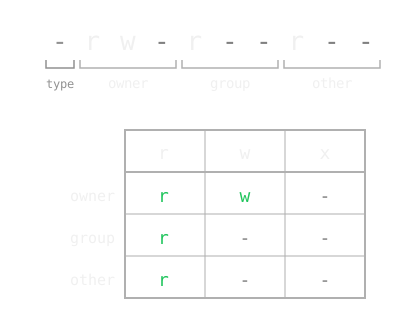
Figure 1: The same -rw-r--r-- restated as a "who × what" grid. Green letters are the permitted actions; - marks the ones that are not permitted. The type label in the diagram is the leading character described above.
In other words, "the owner can read and write, but everyone else can only read"—a very common setting for config files.
Let's check it for real.
ls -l memo.txt
-rw-r--r-- 1 lina lina 42 Jun 6 10:00 memo.txt
A template for reading the 10 characters
- 1st character:
-(file) ord(directory) - Characters 2–4: the owner's rwx
- Characters 5–7: the group's rwx
- Characters 8–10: the other's rwx
When in doubt, chant "type, me, team, everyone else" as you split into threes.
Read columns 3 and 4 of ls -l together
After the permission string, the lina lina part shows the owner name and group name. -rw-r--r-- only means something once you pair it with these owner and group names. Get into the habit of reading the names next to the permission string, not just the string itself.
5. Does rwx Mean the Same Thing for Directories?
Conclusion: No. For directories,
rlists the contents,wadds or deletes files, andxlets you enter (cdinto) it.
rwx. Does it mean the same as for files?r means "you can list the file names in the box," w means "you can add or remove files in the box," and x means "you can enter the box (cd into it)."x becomes "enter" instead of "execute."x on a directory, you can't cd into it even if it has contents, and you can't reach the files inside. That's why directories usually have the x bit set.| Bit | For a file | For a directory |
|---|---|---|
r |
Read the contents | List the file names inside |
w |
Change the contents | Add or delete files |
x |
Run the program | Enter (cd) / access the contents |
Removing x from a directory locks you out even when it has contents
A directory's w only works together with x. Grant w alone and you still cannot create files, because you cannot enter the directory.
If you strip x from a directory, cd fails with Permission denied. When "the file should be there but I can't open it," the cause is often a missing x on the directory side. See Fixing Permission denied for details.
Avoid chmod 777—it allows everyone to do everything
You'll often see chmod 777 online as a quick way to make an error go away. It's a risky shortcut.
- What it does: it grants read, write, and execute to owner, group, and other alike. If someone else overwrites the file, Linux will not stop them.
- The safer choice: start from
644for files and755for scripts and directories. If that's not enough, add only what you need, likechmod u+x. - One reassurance: the virtual terminalAn interactive program that reads the commands you type and runs them. on this site is for learning. Your own computer stays safe, so this is the place to get the
777mistake out of your system.
6. What Are Numbers Like 755 and 644?
Conclusion: They are
rwxwritten as numbers. Add upr=4,w=2,x=1, and write three digits in owner / group / other order.
chmod 755 or 644. What are those?rwx written as numbers—the same permissions, just expressed shorthand with digits instead of letters.r is 4, w is 2, x is 1. Add up the scores of the granted permissions, and that's the digit for that position.rwx would be...?rw- is 4 + 2 = 6. r-- is 4. Line up three of these in owner / group / other order and you get a three-digit number like 644.| rwx | Sum | Digit |
|---|---|---|
rwx |
4 + 2 + 1 | 7 |
rw- |
4 + 2 | 6 |
r-x |
4 + 1 | 5 |
r-- |
4 | 4 |
--- |
0 | 0 |
So 644 means rw-r--r-- (owner=6, group=4, other=4), and 755 means rwxr-xr-x (owner=7, group=5, other=5).
chmod 644 memo.txt
ls -l memo.txt
-rw-r--r-- 1 lina lina 42 Jun 6 10:00 memo.txt
Just memorize these two first
644(rw-r--r--): a normal file. Owner reads and writes; others read only.755(rwxr-xr-x): a script or directory. Owner does everything; others read and execute (enter).
These two cover most everyday cases. For the finer points of numeric versus symbolic modes, dig into chmod Numeric and Symbolic Modes.
7. How Do You Try It Hands-On?
Conclusion: The fastest way to make it stick is to actually type
ls -landchmodin a terminal.
chmod, then watch how ls -l changes—you'll get it in one pass.chmod u+x script.sh ls -l script.sh
-rwxr--r-- 1 lina lina 18 Jun 6 10:05 script.sh
With u+x (add execute for the owner), you can see rw- change to rwx.
Type ls -l and chmod over and over in the Penguin Gym Linux terminal and watch how the display changes. Once you feel "change the number → the string changes," permissions stop being scary.
Lina's Script Won't Run
Conclusion: A file without
xcannot be executed.Permission deniedis your sign to check forxwithls -l.
echo 'echo "Hello, Penguin Gym"' > hello.sh
./hello.sh. That leading ./ means "this file, here in the directory I'm in."./hello.sh... huh, it refused me../hello.sh
bash: ./hello.sh: Permission denied
ls -l.ls -l hello.sh
-rw-r--r-- 1 lina lina 32 Jun 6 10:20 hello.sh
rw-. Oh! There's no x.x. Let's add it with chmod u+x.chmod u+x hello.sh ./hello.sh
Hello, Penguin Gym
Permission denied, I check for x with ls -l first.Mini Exercises
Conclusion: Type the
ls -landchmodcommands from this guide and watch the output change.
touch memo.txt echo 'echo "Hello, Penguin Gym"' > script.sh
Exercise 1: Display a File's Permissions
Task: Show the permissions of memo.txt so that the first 10 characters are visible.
Show Hint 1 (Direction)
Add the option that prints more detail to the listing command. Think of the first letter of "long."
Show Hint 2 (Command name)
Use ls -l.
Show Answer
ls -l memo.txt
-rw-r--r-- 1 lina lina 42 Jun 6 10:00 memo.txt
Exercise 2: Give the Owner Permission to Execute
Task: Add x for the owner of script.sh, then check that the output changed.
Show Hint 1 (Direction)
Pass "who, what, add" to the command that changes permissions. The shorthand for owner was u.
Show Hint 2 (Command name)
Use chmod u+x, then confirm with ls -l.
Show Answer
chmod u+x script.sh
ls -l script.sh
-rwxr--r-- 1 lina lina 18 Jun 6 10:05 script.sh
Exercise 3: Set It Back to 644 in Numeric Mode
Task: Return script.sh to "owner reads and writes, everyone else reads only."
Show Hint 1 (Direction)
Add up r=4, w=2, x=1 and write three digits. The owner gets 4+2; the other two parties get 4 only.
Show Hint 2 (Command name)
Use chmod 644.
Show Answer
chmod 644 script.sh
ls -l script.sh
-rw-r--r-- 1 lina lina 18 Jun 6 10:06 script.sh
Review
Conclusion: Permissions are a 3 × 3 grid of "who × what." Split the 10 characters of
ls -linto threes and you can read them.
ls -l in order: type, me, team, everyone else.x: it means "execute" on a file and "enter" on a directory.644 and 755 are sums of r=4, w=2, x=1.chmod, check with ls -l."Today's 3-Line Summary
Conclusion: The "who × what" grid, how to split the 10 characters, and numeric mode—these three let you read and write permissions.
- Permissions are a 3 × 3 grid of "who" × "what" - assign
r/w/xtoowner/group/other - The first 10 characters of
ls -lare "type + owner + group + other" - read them three at a time;xon a directory means "enter" - Numeric mode is the sum of
r=4,w=2,x=1- learn644(normal file) and755(script or directory) first