Understanding stdin, stdout, and stderr
What you'll be able to do
- Tell apart standard input, standard output, and standard error
- Picture where a command's input and output flow
Prerequisites (read these first)
What Are the Standard Streams?
As you learn the command line, you keep running into symbols like > file and | (pipe). Behind them is a mechanism called the standard streams: stdin, stdout, and stderr.
This guide sorts out the role of each stream, why output is split into two kinds, and how redirection and pipes switch where input and output go — all through a conversation between Lina and Linny-senpai.
What You'll Learn
- What stdin, stdout, and stderr are each responsible for
- Why output is split into two streams (stdout and stderr)
- The meaning of the numbers 0 / 1 / 2 (file descriptors)
- How to switch destinations with
>,2>, and&> - How to use the pipe
|and input redirection<
1. What Are the Standard Streams?
Conclusion: The standard streams are three paths a command uses. One entrance takes in data, and two exits send out results and errors. They are called stdin, stdout, and stderr.
- Standard input (stdin. The entrance for data): matches the entrance where materials come in
- Standard output (stdout. The exit for results): matches the exit where finished products flow out
- Standard error (stderr. The exit just for errors): matches the alarm that signals a defect
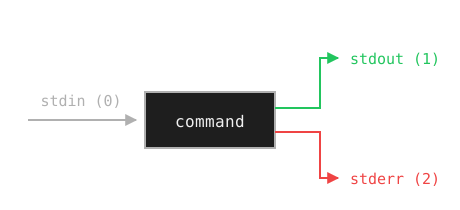
Figure 1: One entrance (stdin) and two exits (stdout and stderr). The numbers in parentheses are explained under "What Are the Numbers 0 / 1 / 2?".
What "standard" means
"Standard" means "the default pathA string that describes the location of a file or directory. used unless you say otherwise." For example, the result of ls appears on screen because stdout's default destination is the screen (the terminalAn interactive program that reads the commands you type and runs them.). Redirection and pipes are just ways to change that destination afterward.
2. Why Is Output Split Into stdout and stderr?
Conclusion: To keep "results you want to pass on" separate from "errors a human should read." Splitting them lets you save just the results, or grab just the errors.
- stdout = normal results (data you want to pass on or save)
- stderr = errors and warnings (messages meant for a human)
Back to the factory example
stdout is the conveyor belt carrying finished products. stderr is the alarm that signals a defect. You don't want the alarm sound inside the box of finished goods (the file). So they're kept separate.
3. What Are the Numbers 0 / 1 / 2?
Conclusion: stdin, stdout, and stderr are assigned the numbers 0, 1, and 2 (file descriptors). The
2in2>refers to that number.
2> in an example. What is that 2?| Number | Name | Role |
|---|---|---|
| 0 | stdin | Standard input (entrance) |
| 1 | stdout | Standard output (normal exit) |
| 2 | stderr | Standard error (error exit) |
How numbers map to symbols
The redirection symbols connect directly to these numbers.
>is shorthand for1>(sends stdout)2>sends stderr<is shorthand for0<(reads stdin)
Once you remember "the 2 in 2> is stderr's jersey number," the symbols make sense.
4. How Do I Change Where Output Goes?
Conclusion: Use
>to send stdout and2>to send stderr to a file. To combine both, use> file 2>&1or&> file.
ls /etc > filelist.txt
With >, the stdout content that would have appeared on screen is written to filelist.txt instead. Nothing appears on screen. Note that > overwrites, while >> appends.
> is handy. Let me try it. I ran ls /etc > notes.txt, then right after that I ran ls /home > notes.txt too.notes.txt the first time.> only overwrites. Point it at the same filename again, and the old content is gone. To keep both, use >> (append).> doesn't "save" — it "replaces"...! I'll use >> from now on.Watch out for accidental overwrites with >
When you save a file in a GUI app, you get a promptA symbol (like $ or #) shown when the shell is waiting for your input.: "A file with this name already exists. Overwrite it?" > has no such prompt. The moment you press Enter, the old content is gone — and it doesn't even go to the trash.
To use it safely, make these two habits:
- Use
>>(append) when you want to keep the previous content - Check with
ls filenamebefore saving, to see whether a file with that name already exists
Note that this site's virtual terminal is for learning. Trying > here won't damage any files on your own computer, so practice freely.
To save only the errors, use 2>.
ls /not-exist 2> errors.txt
Nothing appears on screen this time. errors.txt records the following single line.
ls: cannot access '/not-exist': No such file or directory
> and stderr is 2>. What if I want both in one file?2>&1. It means "send stderr (2) to the same destination as stdout (1)."command > output.txt 2>&1
Order matters with 2>&1
2>&1 means "make stderr match stdout's current destination." So you must write > output.txt first. Reverse the order, like command 2>&1 > output.txt, and stderr stays pointed at its old destination (the screen). If you don't want to worry about order, the &> file notation sends both at once too. Note that this is bash-specific syntax — bash is the shell commonly used by default on systems like Ubuntu, the program that receives and runs the commands you type.
command &> output.txt
5. How Do Pipes and Standard Input Work?
Conclusion: A pipe
|connects the left command's stdout to the right command's stdin.<feeds a file's contents in as stdin.
| connects the left command's stdout directly to the right command's stdin.ls /etc | grep conf
In this example, the output (stdout) of ls /etc flows straight into the input (stdin) of grep conf. grep then picks out only the lines that contain conf.
Picture the flow
ls /etc ──stdout──▶ | ──stdin──▶ grep conf ──stdout──▶ screen
A pipe is like a hose connecting the previous command's exit directly to the next command's entrance.
To feed a file's contents in as stdin, use <.
sort < names.txt
This streams the contents of names.txt into the standard input of sort, which sorts and prints them. The result is the same as sort names.txt. But it makes the "connect a file to stdin" behavior of standard input easy to see.
To practice pipes and redirection more hands-on, see Pipes and Redirection Basics. When you want output to go to both the screen and a file, How to Use the tee Command is handy.
Mini Exercises
Conclusion: Practice redirecting stdout and stderr, and piping, by trying it yourself.
Exercise 1: Save only the result of ls /etc to etc-list.txt (nothing should appear on screen)
Show Hint 1 (Direction)
There's a symbol that switches where output goes, from the screen to a file. Overwriting is fine here.
Show Hint 2 (Command Name)
Use >.
Show Answer
ls /etc > etc-list.txt
Nothing appears on screen. etc-list.txt now holds the /etc listing.
Exercise 2: Point ls at a directoryA container that organizes files. Same idea as a "folder" on Windows or macOS. that doesn't exist, and save only the error message to err.txt (no error should appear on screen)
Show Hint 1 (Direction)
There's a symbol that routes only the error exit — not the normal output — to a file.
Show Hint 2 (Command Name)
Use 2>.
Show Answer
ls /no-such-dir 2> err.txt
Nothing appears on screen. err.txt records ls: cannot access '/no-such-dir': No such file or directory.
Exercise 3: Show only the lines from ls /etc that contain conf, on screen (don't save to a file)
Show Hint 1 (Direction)
There's a mechanism that feeds one command's output straight in as the next command's input.
Show Hint 2 (Command Name)
Use the pipe | with grep.
Show Answer
ls /etc | grep conf
Only the lines from ls /etc that contain conf appear on screen.
Summary
- The standard streams are three paths: stdin (input), stdout (normal output), and stderr (error output)
- There are two output streams to keep "results" and "errors" from mixing
- The three are assigned the numbers 0 / 1 / 2 (file descriptors)
- Use
>for stdout and2>for stderr to send them to a file (both with> file 2>&1or&> file) - A pipe
|connects stdout to the next stdin, and<feeds a file in as stdin